 System addresses
System addresses
System addressesMenu Project – System addresses.
This connects system functions that are otherwise only reachable through the web interface with a variable. The user can for example release remote maintenance with a KNX push button and has the certainty that it cannot be switched on again through the APP.
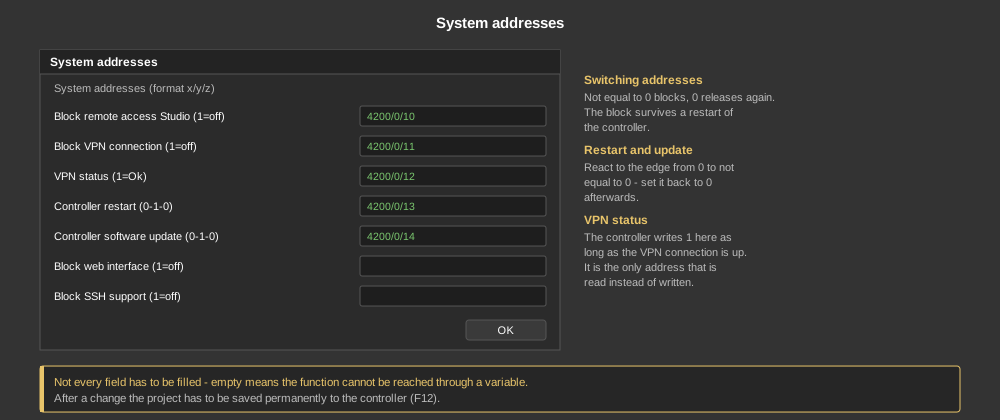
One address in the format x/y/z is entered for each function. Not every field has to be filled – if it stays empty, the function is simply not reachable through a variable.
| Block remote access Studio (1=off) | Not equal to 0 blocks the login: no connection to the controller with the Studio is possible any more. 0 releases it again. |
| Block VPN connection (1=off) | Not equal to 0 switches the VPN off, the controller then no longer connects to the server. The shutdown survives a restart of the controller until the variable is set back to 0. |
| VPN status (1=Ok) | The only address that is read instead of written: the controller writes 1 here as long as the VPN connection is up, otherwise 0. This allows the state of the remote connection to be displayed or monitored in the visualization. |
| Controller restart (0-1-0) | Evaluated is the change from 0 to not equal to 0 – then the controller restarts. Afterwards the variable has to be set back to 0, otherwise the next restart does not trigger. |
| Controller software update (0-1-0) | Edge controlled as well: the change from 0 to not equal to 0 starts a software update. |
| Block web interface (1=off) | Not equal to 0 switches the web server of the controller off, the web interface is then no longer reachable. 0 switches it on again. |
| Block SSH support (1=off) | Not equal to 0 switches the SSH access off, through which remote maintenance runs. 0 switches it on again. |
Important: After a change the project has to be saved permanently to the controller (F12). Transferring it into the memory (F5) is not enough, because the system addresses are read on start-up.
Tip: The addresses can be assigned any variable, including a purely internal one from a main group from 32 upwards. If the block is to come from a KNX push button, a group address from the KNX range is used, see Variables.