 Block Energy Manager
As a presentation: Block Energy Manager - functions and benefits at a glance, for customer meetings and training (arrow keys to browse, F for full screen).
This control element shows the energy flow in the house – photovoltaics, grid, battery and consumption – and operates the distribution of the solar power: which consumers get the surplus in which order and how they are operated.
Note: The control element is only available in the new block design. In the previous design it only shows the text "Only available in the new design".
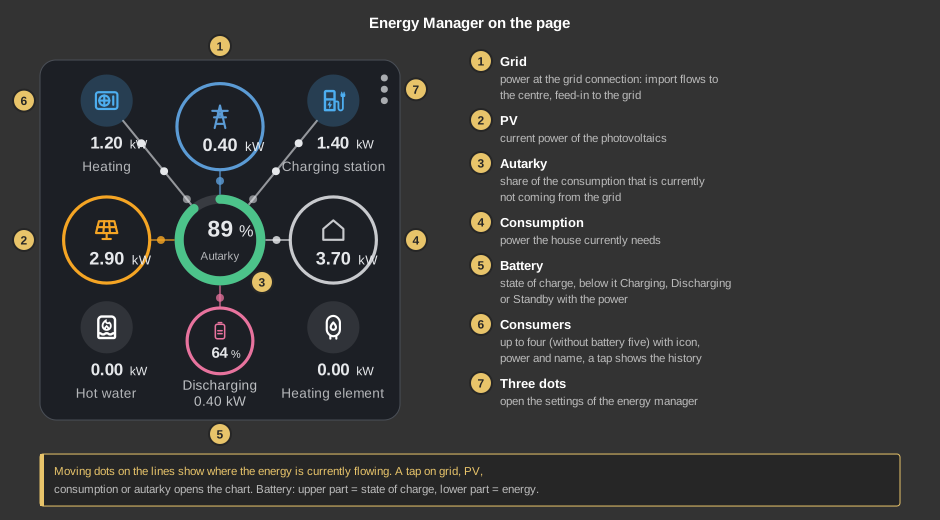
Moving dots on the connecting lines show where the energy is currently flowing. A tap on grid, PV, consumption or autarky opens the chart for it. The battery has two tap areas: the upper part opens the history of the state of charge, the lower part the charged and discharged energy.
The three dots at the top right open the sheet Energy Manager. When opened, it fetches the current values from the controller. Changes only take effect with Save; if the sheet is closed without saving, they are discarded. State and power of the consumers are updated continuously.
If the heat pump's hot water is set to Always off and the heater rod does not keep a minimum temperature, the note "Hot water without minimum temperature" appears at the top – the water could then cool down. Remedy: set hot water back to Automatic or set a minimum temperature for the heater rod.
With schedules, the Energy Manager changes settings by itself at a given time. Typical use: you switch the battery priority off by hand during the day and let a schedule switch it back on at midnight – so it is not left off by mistake. The list works as with the other block elements: week, date or sun position, weekdays, "Applies to" for present, absent and vacation, and Once or Always. Save in the list stores the schedules.
Each schedule performs exactly one action:
Battery priority and operating mode apply to the profile that is active at the time of the schedule. A schedule changes the same setting as a tap in the sheet: if the operating mode input of a consumer is connected at the block ("Ext."), this input still decides. To change several things at the same time, create several schedules with the same time.
All values that exist in the Energy Manager are described here. Which of them appear in the sheet depends on what is set up in the system and what the installer has released for adjustment. A value fixed by the installer is only displayed.
| Switch-on power or minimum power |
How much surplus must at least be available for the consumer to switch on (plus the reserve). For continuous consumers such as heater rod or charging station, the smallest power it runs with. Set by the installer, not visible in the control element. |
| Rated power or maximum power |
The power the consumer takes while running, or for continuous consumers the largest power. This tells the Energy Manager how much of the surplus the consumer occupies. Set by the installer, not visible in the control element – except for the charging station, see Max. charging power. |
| Max. charging power | Charging station only. It never charges with more power, not even in the Fast mode. |
| Switch-on delay | The surplus must be sufficient for this long without interruption before the consumer switches on. Prevents a short gap in the clouds from starting a device. |
| Switch-off delay | The surplus must be missing for this long without interruption before the consumer switches off again. A passing cloud therefore does not switch it off right away. |
| Minimum pause | After switching off, the consumer switches on again at the earliest after this time, e.g. to protect a compressor. 0 = no pause. |
| Battery rule | Whether the consumer may take the power that would otherwise go into the battery. Always before the battery: yes. Before the battery, except battery priority: yes, unless battery priority is switched on. From battery state of charge: only from the set state of charge, below that only real feed-in. Feed-in only: no, the consumer only gets what would go into the grid – i.e. only when the battery is full or cannot charge any more. Only with a battery. |
| From battery state of charge | Only with the battery rule "From battery state of charge": from this state of charge on, the consumer may also take the charging power of the battery. |
| Time window from / to | The consumer only runs during this time, also across midnight. Off = no time window, it runs at any time. |
| Only curtailed energy | Yes: the consumer only gets the energy that would otherwise be lost because of the feed-in limit – so it runs exactly when the system would have to curtail. Without a feed-in limit it has no effect. |
| Runtime per day | Minimum runtime per day in minutes, e.g. for a pool pump. Together with "Catch up from". 0 = none. |
| Catch up from | If the consumer has not reached its runtime per day by this time, it runs from then on even without surplus (with power from the battery or the grid) until it is reached. Only with a runtime per day. |
| Reserve | Power that must be available in addition to the switch-on power when switching on. Continuous consumers control so that this power is still fed in – a small buffer against drawing from the grid. |
| Feed-in limit | How much the system may feed into the grid at most (e.g. requirement of the grid operator). Only needed for "Only curtailed energy". 0 = no limit. If it is fixed, it is only displayed. |
| Battery priority up to | With battery priority switched on, the battery is charged first up to this state of charge. |
| Battery supports from | From this state of charge, the battery may briefly keep supplying a running consumer when the surplus is missing (e.g. with a cloud). 0 = never. |
| Battery supports at most | The battery supports for this long at most; then the switch-off delay of the consumer begins. |
Heating is the heat pump with the entries Heating and Boost heating. Room and outdoor values only take effect if the system has a room or outdoor sensor.
| Room minimum temperature | If the room is colder for longer than the cold protection delay, the heat pump heats even without surplus (cold protection). Only with a room sensor. |
| Room minimum temperature hysteresis | Cold protection ends when the room has exceeded the minimum temperature by this value. |
| Room maximum temperature | Boost heating with surplus up to this room temperature, not above it. |
| Room maximum temperature hysteresis | Boost heating is only allowed again when the room has fallen this far below the maximum temperature. |
| Outdoor heating limit | If it is warmer outside, there is no heating – neither with surplus nor in cold protection. Only with an outdoor sensor. |
| Cold protection delay | The room must be below the minimum temperature for this long before cold protection starts. |
| Room setpoint | Room setpoint the Energy Manager gives the heat pump in normal operation. Only effective if the heat pump gets its setpoint from the Energy Manager (e.g. via Modbus); if the heat pump is only released, the value has no effect. |
| Room setpoint boost heating | Room setpoint during boost heating with surplus. If it is above "Room setpoint", the heat pump stores the surplus as heat in the house. Like "Room setpoint", only effective if the heat pump gets its setpoint from the Energy Manager. |
| Heating curve offset boost heating | The heat pump's heating curve is raised by this much during boost heating. Only effective if the heat pump gets this offset from the Energy Manager. |
The heat pump's hot water. The temperatures refer to the sensor at the top of the tank.
| Hot water normal | Hot water setpoint the heat pump gets without surplus. Only effective if the heat pump gets its hot water setpoint from the Energy Manager. |
| Hot water with surplus | The heat pump charges the tank with surplus up to this temperature. |
| Hot water hysteresis | Charging with surplus starts again when the tank has fallen this far below "Hot water with surplus". |
| Hot water minimum temperature | If the tank falls below it, the heat pump charges even without surplus (protective function). |
| Hot water minimum charge up to | The charge without surplus goes up to this temperature. |
| Heater rod setpoint | The heater rod heats with surplus up to this temperature. If heat pump and heater rod share a tank, it should be above "Hot water with surplus" – then the more economical heat pump charges first. |
| Heater rod hysteresis | The heater rod heats again when the tank is this far below the target. Applies to setpoint, minimum temperature and Always on. |
| Heater rod minimum temperature | If the tank falls below it, the heater rod heats at full power even without surplus, if necessary with power from the grid. 0 = off. If the heat pump's hot water is set to Always off (e.g. in summer), this value keeps the water warm. |
| Heater rod always on up to | In the operating mode Always on, the heater rod heats at full power up to this temperature. |
How the Energy Manager calculates is described for the function block Block Energy Manager.
| running | The consumer is on. |
| waiting for surplus | Not enough power is free. |
| waiting for the battery | Power would be available, but according to the battery rule or battery priority it goes into the battery first. |
| outside time window | The time is outside the time window. |
| minimum pause | The consumer was just switched off and may not switch on again yet. |
| no request | The consumer currently needs nothing, e.g. because its thermostat does not request. |
| temperature reached | Room or hot water has reached the target temperature. |
| Always on / Always off | The operating mode is set by hand. |
| protection function | Runs even without surplus: room or hot water is too cold. |
| catching up runtime | The runtime per day has not been reached yet and is now being made up. |
| switch-on delay / switch-off delay | The surplus is there or missing, the delay is still running. |
| waiting for curtailment | The consumer only takes energy that would otherwise be curtailed. |
| operating mode input | The operating mode is set from outside (e.g. holiday). |
In the new design: the share symbol in the title bar passes on the chart as a picture, just as it is shown: on a PC the picture is then in the clipboard and can also be saved as a PNG file, on Android and iOS the share menu of the device opens. In the settings behind the gear, Export as CSV saves the displayed data as a CSV file, for example for evaluation in Excel: the selected time range, one column per line.
This section is meant for the installer of the system.
The control element is linked to the function block Block Energy Manager: first create the function block, set up its areas, consumers, limits and profiles and assign addresses to its inputs and outputs, then right-click the control element and select the function block. The addresses are taken over in the process, and the name of the block as text. Which consumers, areas and profiles the control element shows and how far the user may change what comes entirely from the block.
Important: the control element reads grid, PV, battery, consumption and autarky from the addresses at the terminals of the block. If one of these terminals is only wired internally and has no address, its display stays at 0. The battery only appears if the area Battery is switched on at the block; the direction of the battery power is set by the parameter Battery power positive.
The settings are stored in the controller and not in the project. They are kept when a project is transferred, but can only be read and written while a connection exists. If the function block is deleted and created again, the control element must be linked again.
| Text | Name of the control element, e.g. in the header of the chart. When linking, the name of the function block is taken over. |
| Background / Font | Colours if no style is active. With a style, the colours of the style apply. |
The addresses come from the link with the function block and do not have to be entered by hand. Displayed are:
| Grid power kW | Input NL, positive = import, negative = feed-in. |
| PV power kW | Input PV, the power of the photovoltaics. |
| Battery power kW Battery charge % |
Inputs AL and AS, only with the Battery area. |
| Consumption kW | Output VB, calculated from grid, PV and battery. |
| Autarky % | Output AT. |
See also General properties of all control elements.