 Formatting the value display
Formatting the value display
Formatting the value displayThe formatting determines how a value appears in the control element: with how many decimal places, with which unit and with which text before or after it. It is found on every control element that displays a value, for example Text value, Progress, Slider and Value input.
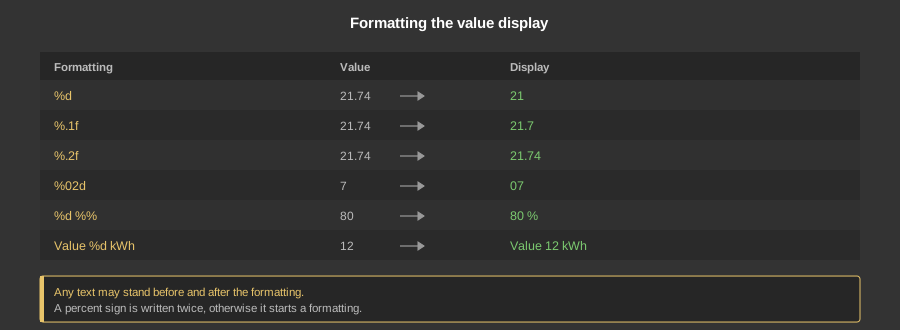
The input field is a selection list with the most common entries (%d, %d %%, %.1f, %.2f, %.3f), but it can also be written freely.
| %d | Whole number without decimal places. Decimals are cut off, not rounded: 21.74 becomes 21. |
| %.1f to %.6f | Number with one to six decimal places, here it is rounded. %f on its own and %.0f are possible as well. |
| %02d | Whole number with leading zeros to at least two digits, so 7 becomes 07. The 0 is the fill character, the 2 the number of digits. |
| %d %% | Number with a percent sign. The percent sign has to be written twice, because a single % marks the beginning of a formatting. |
| %s | Text. Only works with variables of the data type EIS 15 string 14 byte – with all other data types a numeric value is shown. |
| Text %d Text | Any text may stand before and after the formatting, for example %d kWh, %.1f °C or Level %d. |
Unlike in the C programming language the entry is not fully evaluated. The Studio only recognises whether a decimal number is meant and then passes the value on as a decimal number – otherwise as a whole number. Counted as decimal numbers are %f, %.0f to %.6f and %0.1f to %0.6f.
All other spellings with f, for instance %05.1f or %8.2f, are not recognised as a decimal number and produce an unusable display. The same applies to %e and %g. Likewise an entry may only ever contain one placeholder.
The formatting only changes the presentation, not the value. If the displayed value is to be converted, most control elements additionally offer the parameters Factor and Offset: the value is first multiplied by the factor, then the offset is added and only the result is formatted. A power value in watts with the factor 0.001 and the formatting %.2f kW therefore becomes a display in kilowatts.
Tip: Time and date variables (EIS 3 and EIS 4) bring their own presentation, the formatting is not evaluated for them.